

The morning shift is expecting 120 pallets. The warehouse dashboard shows 850 occupied positions out of 1,000. On paper, that leaves room for the entire delivery, with 30 positions to spare. Then the receiving supervisor checks the list. Fifty of the empty positions are blocked for rack repairs. Only 100 can take a pallet today.
The warehouse is 85% occupied, yet it is 20 positions short for the incoming delivery. Both figures are correct. They answer different questions.
For a warehouse that stores goods in pallet racks, one practical way to measure space utilization is to count how many pallet positions are occupied. To plan an incoming delivery, the receiving team needs a second measure: how many positions are empty, cleared for use, and suitable for the pallets on the way?
How to calculate warehouse space utilization by pallet position
A pallet position is one designated place in a rack for one pallet. If a rack bay accommodates two pallets side by side on each of three storage levels, that bay has six pallet positions. Counting bays instead of individual positions would give the wrong denominator.
For a rack occupancy report, use this formula:
Pallet position occupancy (%) = Occupied pallet positions ÷ Total installed pallet positions × 100
For receiving, calculate a second percentage using the same denominator:
Ready-to-use positions (%) = Empty positions cleared for immediate use ÷ Total installed pallet positions × 100
Record both figures at the same point in time. A count taken before the morning dispatch and an availability report run after it can describe two different warehouse conditions, even if they are only an hour apart.
Worked example: 1,000 pallet positions, 100 ready for receiving
Assume the incoming pallets are standard size, each needs one position, and none of the available positions has been reserved for another delivery.
| Position status at the start of the shift | Positions | Share of total | What it means for receiving |
|---|---|---|---|
| Occupied | 850 | 85% | A pallet is already stored here |
| Empty and ready to use | 100 | 10% | Receiving can assign these positions now |
| Empty but blocked for repairs | 50 | 5% | These positions remain unavailable until released |
| Total installed positions | 1,000 | 100% |
The occupancy calculation is 850 ÷ 1,000 = 85%. There are 150 physically empty positions, but the ready-to-use calculation is 100 ÷ 1,000 = 10%. For the 120 pallets due this morning, the supervisor can assign 100 positions and needs a plan for the remaining 20.
Now suppose 30 outbound pallets are scheduled to leave at noon. If the inbound truck arrives at 9 a.m., those future openings do little to help the morning shift. If the truck arrives at 2 p.m., the supervisor can use those positions once dispatch confirms the pallets have left and the locations are released. The time a position becomes available matters as much as the number of positions on the report.
How many pallet positions will be available when the truck arrives?
Start with the positions that are empty, suitable for the shipment, and cleared for use now. Add any suitable positions due to be released before the truck arrives. Then subtract positions that will be taken by other deliveries before that time.
Projected positions available at arrival = Ready positions now + Positions due for release before arrival − New commitments before arrival.
Suppose 100 positions are ready at 9 a.m. and 30 more are due to open by noon. Another truck is booked to use 15 of those positions at 1 p.m. For a 2 p.m. delivery, the projected capacity is 100 + 30 − 15 = 115 positions. A truck carrying 120 pallets would still be five positions short, even if dispatch releases all 30 on time.
Count each reservation once. If the WMS has already excluded a reserved position from the starting figure, it has already been accounted for.
If a pallet has left but the WMS still lists its position as occupied, check the record against the physical rack location before assigning that space to an incoming pallet.
Start with the scan evidence. A drone reaches rack position A-03-05 and returns no QR read. The position could be empty. It could also contain a carton whose label faces away from the aisle. Record the result as unconfirmed and review the image or request a physical check before assigning an incoming pallet. Digitalplace.ai explains why a missing QR code does not prove a rack position is empty.
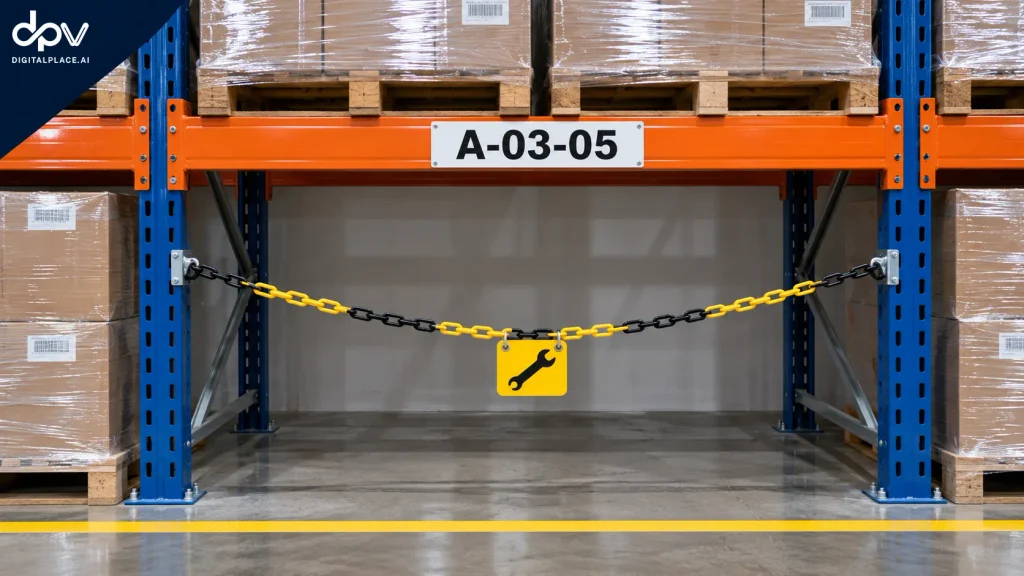
- Initial WMS status. Bay A-03-05 shows no assigned pallet. A maintenance hold is active.
- Rack observation. The bay is empty. A yellow-and-black chain spans the opening, with a maintenance tag attached.
- Staff check. The supervisor checks the work order and confirms that maintenance has yet to release the bay.
- Receiving decision. Keep A-03-05 blocked and assign the incoming pallet to another cleared position. A-03-05 counts as empty in the occupancy report and contributes zero to ready-to-use capacity.
How do you know an apparently empty position is actually available?
Once the position is confirmed empty, check its status in the warehouse management system (WMS). A clear image can show that a pallet has moved. The maintenance record tells the supervisor whether the position is still blocked, and the reservation record shows whether another delivery already has a claim on it. Receiving needs all three pieces of information before assigning the slot.
Why two teams might report 85% and 89.5% for the same warehouse
A planner may exclude the 50 positions blocked for repairs and calculate occupancy using only the 950 serviceable positions. With the same 850 pallets in storage, 850 ÷ 950 = 89.5%.
That figure helps a manager understand how heavily the warehouse is using the racks currently in service. The original 85% figure shows how much of the full installed rack capacity is occupied. Label the figures occupancy of serviceable positions and occupancy of installed positions so that anyone comparing shifts or sites can see which denominator was used.
For the person unloading the truck, the most useful number is still 100 positions ready now. Changing the denominator does not create another place to put a pallet.
Pallet positions, floor area, and cubic space measure different things
Counting positions works well when the decision is how many pallets a rack can accept. Other space-planning decisions call for different measurements.
| If the question is… | Measure to use | How to calculate it |
|---|---|---|
| How many installed rack positions hold a pallet? | Pallet position occupancy | Occupied positions ÷ installed positions × 100 |
| How much of the usable floor area is allocated to storage? | Storage floor-area share | Floor area allocated to storage ÷ total usable floor area × 100 |
| How much of the usable storage volume do the goods fill? | Cubic storage utilization | Volume occupied by goods ÷ usable storage volume × 100 |
Consider a short pallet load in a tall rack opening. It occupies one full pallet position even if the goods fill only half the usable height. A position count captures the receiving constraint: another pallet cannot simply be placed in the space above it. A cubic measurement reveals a different opportunity: shorter loads might fit better in a rack zone with lower openings.
What to check before assigning the next delivery
Even 100 verified, available positions may offer fewer than 100 suitable destinations for a particular shipment. Suppose 40 incoming pallets require chilled storage, and only 25 of the available positions are in the chilled zone. The receiving team is short 15 chilled positions, even while ambient positions stand empty.
For each delivery, give the receiving supervisor four numbers:
- Pallets due, grouped by arrival time and storage requirement.
- Suitable positions available now, after checking dimensions, zone, blocks, and reservations.
- Positions expected to open before arrival, with the outbound movement or release still to be confirmed.
- Positions still unconfirmed, so staff know which rack locations to check first.
To test a warehouse inventory drone from Digitalplace.ai, start with one receiving zone and schedule recurring checks of pallet locations before inbound deliveries. Track how many previously unconfirmed positions the supervisor can release for putaway after reviewing the scan and checking for reservations or maintenance blocks.
A shift handover can then give the next supervisor an actionable answer in one sentence: “We have 100 confirmed positions for 120 pallets due at 9 a.m., and the next 30 positions are expected to open at noon.” That tells receiving how much it can put away, when more space may become available, and which part of the delivery still needs a destination.